
Terminal Tools Every DevOps Engineer Should Be Using in 2026
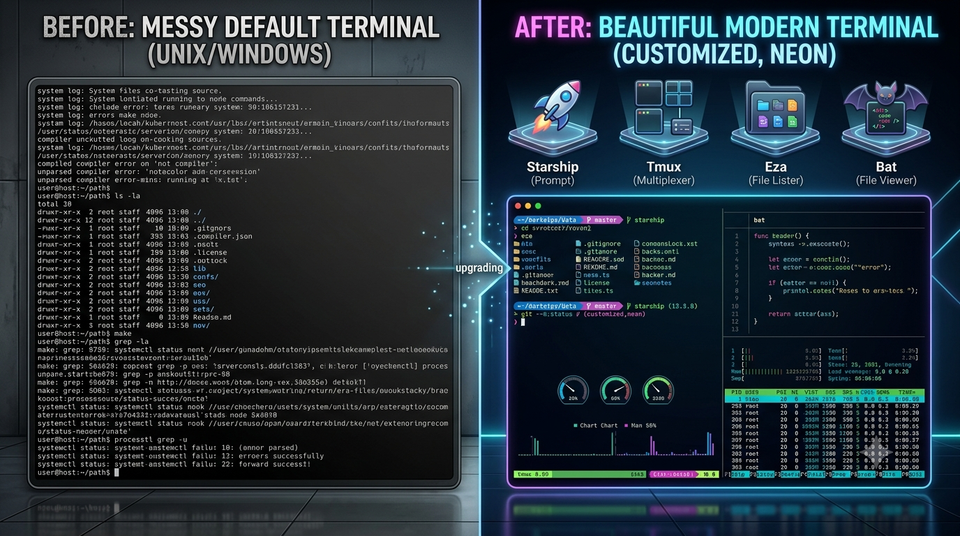
I've been a DevOps/Platform Engineer for close to 9 years.
And one thing I've learned — your tools are either making you faster or slowing you down. There's no middle ground.
Most engineers learn ls, cd, grep and call it a day.
But the engineers who move fast? They've invested in their terminal setup the same way a carpenter invests in good tools.
This is my personal list — tools I actually use, tools I've tested on my homelab, and a few that genuinely surprised me when I first found them.
Let's go. 🛠️
🖥️ Terminals — Stop Using the Default One
Ghostty (Mac/Linux) ⭐
The new king of terminals in 2026.
Built in Zig, GPU-accelerated, native macOS feel. No Electron, no bloat. Just blazing fast rendering with zero input lag.
I switched from iTerm2 and the difference was immediately noticeable. Commands feel instant. Scrolling is buttery smooth.
brew install ghostty
Best for: Mac/Linux users who want speed above everything
Warp (Mac/Linux)
Warp is not just a terminal — it's a reimagination of what a terminal should be.
The killer feature? AI command assistance built in.
Type what you want in plain English. Warp suggests the exact command. That find command with 6 flags you can never remember? Just describe it.
"find all files larger than 100MB modified in the last 7 days"
→ find . -type f -size +100M -mtime -7
Also has block-based output grouping — each command and its output are visually grouped. Makes debugging long outputs much cleaner.
Best for: Engineers who want AI assistance without leaving the terminal
Windows Terminal (Windows)
If you're on Windows — this is non-negotiable. Stop using PowerShell's default window.
Windows Terminal supports multiple tabs, GPU acceleration, WSL2 integration, and custom themes. It's Microsoft's best gift to developers in years.
Pair it with WSL2 + Ubuntu and you have a Linux environment on Windows that's actually usable for DevOps work.
winget install Microsoft.WindowsTerminal
wsl --install -d Ubuntu
🚀 Shell Productivity — Work Smarter, Not Harder
Atuin — Supercharged Shell History
This one blew my mind.
<cite index="49-1">Atuin completely replaces your shell's default history. Instead of a basic ~/.zsh_history file, Atuin stores every command you've ever run in a searchable SQLite database. Hit your Up-Arrow key, and you get a beautiful, full-screen fuzzy search interface. You can filter by directory, exit code, or even sync it across multiple machines. That complex Docker command from last month? Found in seconds.</cite>
curl --proto '=https' --tlsv1.2 -LsSf \
  https://setup.atuin.sh | sh
I use this daily. Searching for a kubectl command I ran 3 weeks ago takes 2 seconds instead of 20 minutes of Slack searching.
Best for: Anyone who types the same complex commands repeatedly
Zoxide — Smarter cd
You know what's annoying? Typing cd ~/Documents/projects/homelab/k8s/ghost/ every time.
<cite index="49-1">Zoxide is a smarter cd command written in Rust. It learns your habits. If you frequently go to ~/Documents/Dev/projectX/backend/src, you can just type z back and Zoxide will take you there.</cite>
brew install zoxide
# Add to .zshrc
eval "$(zoxide init zsh)"
Now I just type z ghost and I'm in the Ghost k8s directory instantly.
Best for: Engineers who navigate deeply nested directories constantly
Starship — The Best Shell Prompt
Your prompt tells you everything at a glance — git branch, kubernetes context, exit codes, language versions.
Starship is the fastest, most customizable prompt available. Works on Bash, Zsh, Fish. Works on Mac, Linux, Windows.
brew install starship
echo 'eval "$(starship init zsh)"' >> ~/.zshrc
My prompt shows:
- Current git branch
- Current k8s context (so I don't
kubectl applyon prod accidentally) - Exit code if last command failed
- Python/Node version if in that project
tmux — Never Lose Your Work Again
<cite index="53-1">tmux means I never lose context. I can detach, close my laptop, and pick up exactly where I left off.</cite>
This is especially valuable when SSH-ing into servers. Your session survives network drops, laptop closes, anything.
brew install tmux

# Start a session
tmux new -s homelab

# Detach (session keeps running)
Ctrl+B, D

# Reattach later
tmux attach -t homelab
I run tmux on all my homelab nodes. When I SSH into node-1, I reattach my session and everything is exactly where I left it.
Best for: Anyone who SSH-es into remote servers regularly
🔍 Modern CLI Replacements — Rust Tools That Slap
The Rust ecosystem has produced better versions of almost every classic Unix tool. Here are the ones worth installing:
bat — Better cat
cat shows file contents. bat shows file contents with syntax highlighting, line numbers, and git diff integration.
brew install bat
alias cat='bat'

# View a Kubernetes manifest beautifully
bat deployment.yaml
eza — Better ls
ls is fine. eza is stunning.
brew install eza
alias ls='eza --icons'
alias ll='eza -la --icons --git'

# Tree view of your project
eza --tree --level=2
Shows file icons, git status per file, colorized by type. Once you use it, plain ls looks like a step backwards.
fd — Better find
find . -name "*.yaml" -not -path "*/node_modules/*"
vs
fd .yaml
No contest.
brew install fd
fd .yaml k8s/
ripgrep (rg) — Better grep
Searches recursively, respects .gitignore, blazing fast.
brew install ripgrep
rg "ghost" k8s/
I use this constantly when searching through Kubernetes manifests and Terraform configs.
🌐 Network & API Tools
HTTPie — Human-Friendly curl
curl is powerful but the syntax is painful.
# curl way
curl -X POST https://api.example.com/posts \
  -H "Content-Type: application/json" \
  -H "Authorization: Bearer token123" \
  -d '{"title": "Hello"}'

# HTTPie way
http POST api.example.com/posts \
  Authorization:"Bearer token123" \
  title="Hello"
Much cleaner. Built-in JSON formatting, syntax highlighting, session persistence.
brew install httpie
Netcat (nc) / Nmap — Network Debugging
These ship with most systems but deserve a mention.
# Test if a port is open
nc -zv 10.0.0.10 6443

# Scan your homelab network
nmap -sn 10.0.0.0/24
I use these constantly when debugging why a pod can't reach another service.
📁 File Management
lf — Terminal File Manager
Navigate your filesystem with vim-like keybindings. Preview files. Copy, move, delete — all without leaving the terminal.
brew install lf
rclone — Cloud Storage Swiss Army Knife
Copy files to/from any cloud provider — S3, GCS, Azure Blob, Dropbox, Google Drive — with one tool.
brew install rclone

# Copy to S3
rclone copy /mnt/media s3:my-bucket/media

# Mount Google Drive locally
rclone mount gdrive: ~/gdrive
I use this for offsite backups of my homelab etcd snapshots.
🔐 Security Tools
1Password CLI
Stop putting credentials in environment variables or .env files.
brew install --cask 1password/tap/1password-cli

# Inject secrets at runtime
op run --env-file=.env -- ./deploy.sh

# Get a secret
op read "op://vault/github/token"
Your secrets stay in 1Password. Never touch disk. Never end up in logs.
ssh-keygen + ssh-config
Not a new tool — but massively underused.
# ~/.ssh/config
Host node-1
    HostName 10.0.0.10
    User devops
    Port 22
    IdentityFile ~/.ssh/homelab_key

Host node-2
    HostName 10.0.0.11
    User devops
    IdentityFile ~/.ssh/homelab_key
Now ssh node-1 instead of devops@10.0.0.10. Life-changing for homelab engineers.
📊 System Monitoring
bottom (btm) — Better htop
Beautiful, interactive system monitor. CPU, memory, network, disk — all in one terminal UI.
brew install bottom
btm
lazydocker — Docker TUI
Manage Docker containers without memorizing flags. Visual interface, logs, stats, all in your terminal.
brew install lazydocker
lazydocker
lazygit — Git TUI
Git has too many commands. Lazygit gives you a beautiful visual interface for staging, committing, branching, rebasing.
brew install lazygit
lg
I use this for interactive rebases — something that used to take me 10 minutes of googling now takes 30 seconds.
🤖 AI Tools in Terminal
Claude Code
I use this daily now. Claude directly in my terminal, with access to my codebase. Ask it to write Kubernetes manifests, debug errors, generate scripts.
npm install -g @anthropic-ai/claude-code
claude
Gemini CLI
<cite index="57-1">Gemini CLI is Google's latest open-source command-line AI assistant, embedding the Gemini model directly into your terminal. It's one of the most watched developer tools of 2026. Key features: 1M token context window — understands your entire codebase, built-in Google Search for real-time information, free quota: 1,000 requests/day.</cite>
npm install -g @google/gemini-cli
gemini
📋 My Personal Setup — The Full Stack
Here's what I actually have installed and use daily:
# Terminal
ghostty

# Shell
zsh + starship prompt

# Productivity
atuin          # shell history
zoxide         # smart cd
tmux           # session management

# Modern replacements
bat            # cat replacement
eza            # ls replacement
fd             # find replacement
ripgrep        # grep replacement

# DevOps specific
k9s            # Kubernetes TUI
lazydocker     # Docker TUI
lazygit        # Git TUI
httpie         # API testing

# Security
1Password CLI  # secrets management

# AI
Claude Code    # AI coding assistant
Install everything on Mac in one shot:
brew install ghostty atuin zoxide tmux bat eza fd \
  ripgrep httpie lazydocker lazygit starship \
  bottom 1password/tap/1password-cli

# Add to ~/.zshrc
eval "$(starship init zsh)"
eval "$(atuin init zsh)"
eval "$(zoxide init zsh)"
alias cat='bat'
alias ls='eza --icons'
alias ll='eza -la --icons --git'
alias lg='lazygit'
🏁 Where to Start
Don't install everything at once. That's a trap.
Week 1: Install Ghostty/Warp + Starship. Just better terminal and a better prompt.
Week 2: Add Atuin and Zoxide. Your navigation will feel telepathic.
Week 3: Replace cat/ls/grep with bat/eza/ripgrep. Immediate visual upgrade.
Week 4: Add tmux. Never lose context again.
After a month, your terminal will feel like a completely different environment — and you'll wonder how you worked without these tools.
💬 Final Thought
I spent years using default tools because "they worked."
They did work. But they didn't work well.
The best engineers I know obsess over their tools. Not because they're gear nerds — but because every minute saved on tooling is a minute spent on actual engineering.
Your terminal is where you spend most of your working day. Invest in it.
What's your favourite terminal tool that's not on this list? Drop it in the comments — I'm always looking for new things to add to my setup.
Follow me for more real-world DevOps content → blog.rootbysatya.in
Tags: devops terminal productivity linux macos tools
Member discussion